Diagnostics and plugin dependencies
About NOPAL
In Settings there is an About NOPAL card with the server's diagnostic data. Any signed-in user can see it. It shows:
| Datum | Detail |
|---|---|
| Version | NOPAL's version |
| Commit and branch | If NOPAL runs from a git repository. If you downloaded it as a .zip (no .git) it shows Not available |
| Operating system | Distribution and version, for example Debian GNU/Linux 13 |
| Architecture and Python | Of the server |
| Active language | Your browser's |
| Installed plugins | The list, or No plugins installed |
The Copy diagnostic information button puts everything on the clipboard, ready to paste into an issue or a help request. If the browser does not allow copying, the screen asks you to copy the text by hand.
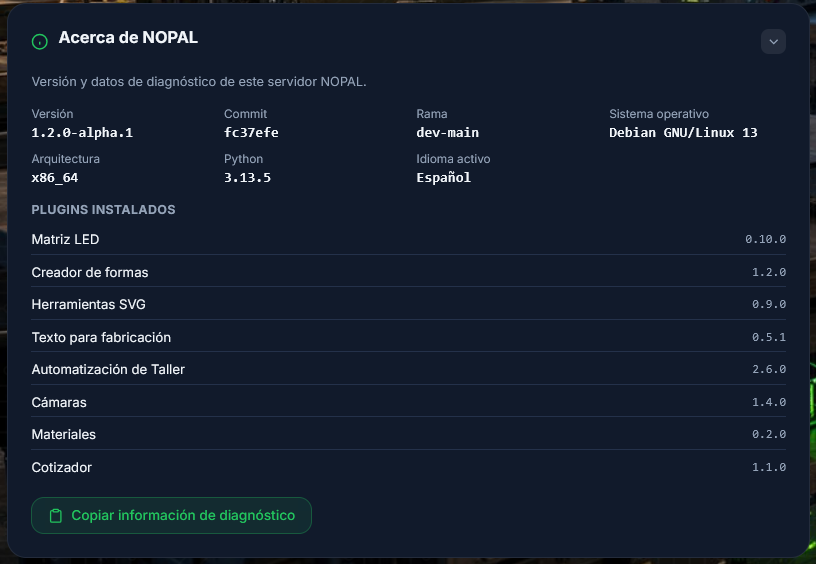
Screenshot of a running system · NOPAL 1.2.0-alpha.1 · Spanish interface · NOPAL Style theme.
Plugin dependencies
NOPAL does not install a plugin's dependencies
When installing a plugin, NOPAL clones its repository and checks only the Python version the plugin declares (python_requires). It does not run pip for its libraries.
What happens if one is missing:
- The plugin's backend fails to import. NOPAL logs it (
no se pudo cargar el backend del plugin) and keeps starting without it. - Its visual part may still load, but its server functions will not respond.
What to do:
- Check the plugin's documentation (Plugins) to see which libraries it needs.
- Install them in NOPAL's virtual environment:
.venv/bin/pip install <package>
- Restart NOPAL (see System control).
- If it still does not load, check the logs.
When NOPAL is updated, only NOPAL's own dependencies (requirements.txt) are reinstalled, not the plugins'.