Configuration backups
Settings → Configuration backup (administrators only) exports and imports NOPAL's configuration. Use it to set up a new installation without reconfiguring everything, or to back up before changing something.
The backup stores configuration, not files. The model and G-code library (uploads/), previews and logs are not included. Copy them separately.
Groups
You choose which groups are exported. The main ones:
| Group | Files |
|---|---|
| 3D printers | Marlin, Elegoo, FlashForge and Bambu Lab registries |
| Laser and CNC | laser_registry.json |
| Logging | logging_config.json |
| Accessories and boards | accessory_registry.json, arduino_boards_config.json |
| Cameras | camera_registry.json |
| Temperature presets | temperature_presets.json |
| Cotizador | pricing_config.json, quotes_registry.json |
| Materials (Spoolman) | spoolman_config.json, spoolman_printer_links.json, spoolman_reservations.json |
| Installed plugins | data/plugins/installed.json |
| Users and passwords (sensitive) | auth_users.json |
| NOPAL Intelligence (sensitive) | ai_config.json |
Files that do not exist in your installation are skipped without error: someone without a laser has no laser_registry.json.
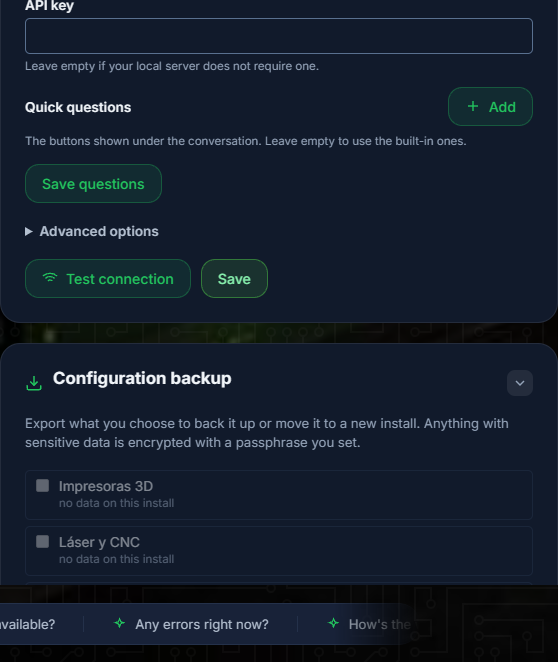
NOPAL 1.2.0-alpha.1 screenshot · English interface · NOPAL Style theme.
Encryption
If you pick a sensitive group (users or the AI key) NOPAL requires an encryption passphrase and encrypts the file with Fernet (AES-128-CBC + HMAC), with a key derived from your passphrase using scrypt and a random salt per file.
- A wrong passphrase or a tampered file fails with a clear error: no garbage is written over your configuration.
- Write the passphrase down. Without it there is no way to open the backup.
What is never exported
.session_secret: with it, sessions of that installation could be forged. It regenerates on its own.- Job histories (
laser_history.json,job_print_log.jsonandjob_deletions.json): they belong to no group. If you move NOPAL to another computer and want to keep them, copy those files by hand. - AI conversations (
ai_conversations.json): they are private to each user. They are not imported either.
Import
- Select the backup file.
- NOPAL inspects it and shows which groups it contains (asks for the passphrase if encrypted).
- You choose which groups to apply.
Before overwriting each file, NOPAL saves a copy with the .pre-import.bak suffix, in case you need to go back.
The Logging group takes effect on the next NOPAL start.
Move NOPAL to another machine
- On the old machine, export the groups you need (include Users if you want to keep the accounts) and copy
uploads/by hand. - On the new machine, install NOPAL and copy
uploads/into the installation folder. - Import the backup.