Job history
It is under Jobs → Job History. It brings together, in a single list, the 3D printing, laser and CNC jobs, with the status and files of each.
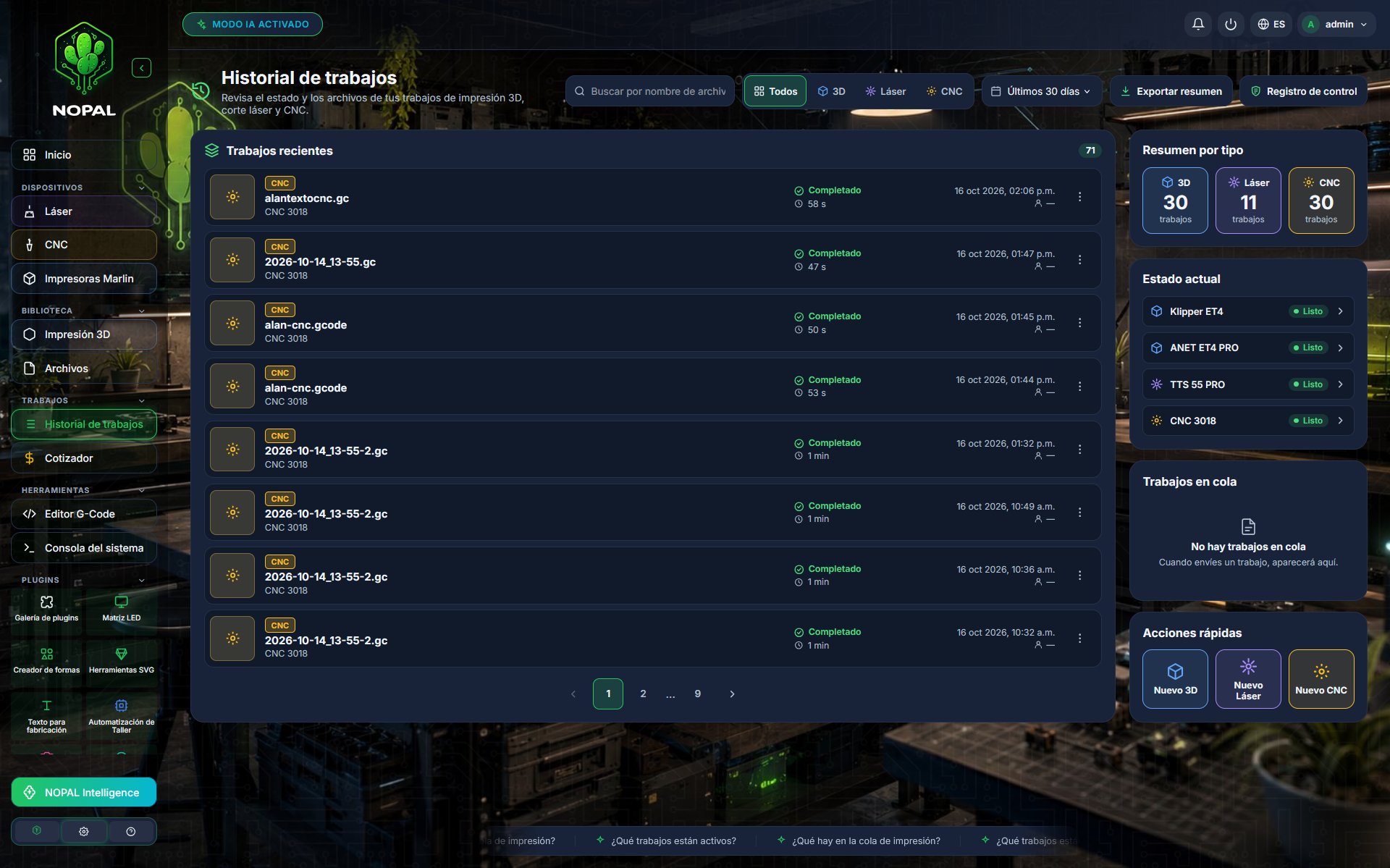
Screenshot of a running system · NOPAL 1.2.0-alpha.1 · Spanish interface · NOPAL Style theme.
What it shows
- Recent jobs: the unified list, newest first.
- Summary by type: how many jobs there are of each type (3D, laser, CNC) with the current filters.
- The current status of your machines, Queued jobs and Quick actions (New 3D, New Laser, New CNC).
Filters and pagination
| Control | Options |
|---|---|
| Job type | All, 3D, laser or CNC |
| Period | Last 7, 30 (default) or 90 days, or Whole history |
| Search | By file name |
| Pagination | 8 (default), 12, 16, 24 or 48 jobs per page |
If there are no jobs you will see "There are no jobs in the history yet"; if the filters match none, "No job matches the filters".
States
Each job is shown as Completed, Cancelled, Error, Incomplete, Running or Sent · result unknown.
- Sent · result unknown is a job NOPAL sent to a printer and for which it is not recorded how it ended.
- If NOPAL stops while a laser or CNC job is running, when it starts again that job becomes Incomplete: no sent job is left unclosed.
Who sent each job
Every job NOPAL sends is recorded with the user who sent it (the Sent by field). 3D prints started by another tool, such as Mainsail or the printer's screen, come from the machine's own history and carry no user.
Klipper printers appear with all their jobs, because NOPAL reads them from Moonraker's history. Marlin, Bambu Lab, Elegoo and FlashForge have no history of their own: only the jobs sent from NOPAL appear, as Sent · result unknown.
Reprint
From a job you can Reprint: you choose the machine to run it on (it shows whether it is offline or busy) and NOPAL sends the file.
- The file must still be in the Library: otherwise you will see "The file is no longer in the Library".
- A job that is running cannot be reprinted.
Export a summary
Export summary downloads the list with the current filters as PDF or XML.
Delete a job from the history
Only an administrator can delete, under strict rules:
- Only failed or incomplete jobs can be deleted (error, cancelled, incomplete). Completed ones cannot, not even by an administrator.
- You must write a reason of 3 to 300 characters.
- "Delete" is a control write-off: the job stops being shown, but it stays in the Control log with who deleted it, when, why and a copy of its data. NOPAL never erases that log nor touches the machine's own history.
Where it is stored
| File | Contents | Limit |
|---|---|---|
laser_history.json | Laser and CNC jobs | 1000 entries |
job_print_log.json | 3D prints sent from NOPAL | 2000 entries |
job_deletions.json | The Control log | Not trimmed |
They are in the NOPAL folder and are not part of the configuration backups.
Who can do what
| Action | Operator | Administrator |
|---|---|---|
| View, filter and export the history | ✅ | ✅ |
| Reprint | ✅ | ✅ |
| Delete a failed or incomplete job | ❌ | ✅ |
| View the Control log | ❌ | ✅ |